ByteDance Seedream 5.5: Consistent Multi-Turn Editing and Accurate Multilingual Text
What is Seedream AI?
ByteDance's newest image model, with multi-turn editing, multi-image reference and multilingual text rendering. New accounts can start with free credits.
Seedream is the image model family from ByteDance's Seed team, the group behind the company's image and video models. It's aimed at design work: posters with accurate headline text, multilingual flyers, and image sets that need character consistency.
Seedream 5.5 is the newest version and the one to start with. Its main upgrade is multi-turn editing consistency: each round of edits leaves the untouched areas unchanged, colors and fine detail included, for up to 100 rounds. Text rendering is cleaner too, small print included, light, materials and skin look more natural than on 5.0, and it can return a picture on a transparent background. 5.0 Flash is the quick, low-cost one for drafts. 5.0 Lite reasons through the prompt before generating and makes the largest files, up to 3K.
Seedream 5.5
The newest version, with consistent multi-turn editing and more accurate multilingual text.
- 1K / 1.5K / 2K
- Up to 10 reference photos
Seedream 5.0 Flash
Fast and low-cost.
- 1K / 2K
- Up to 10 reference photos
Seedream 5.0 Lite
The highest-resolution version in the family.
- 2K / 3K
- Up to 10 reference photos
What Seedream 5.5 is good at
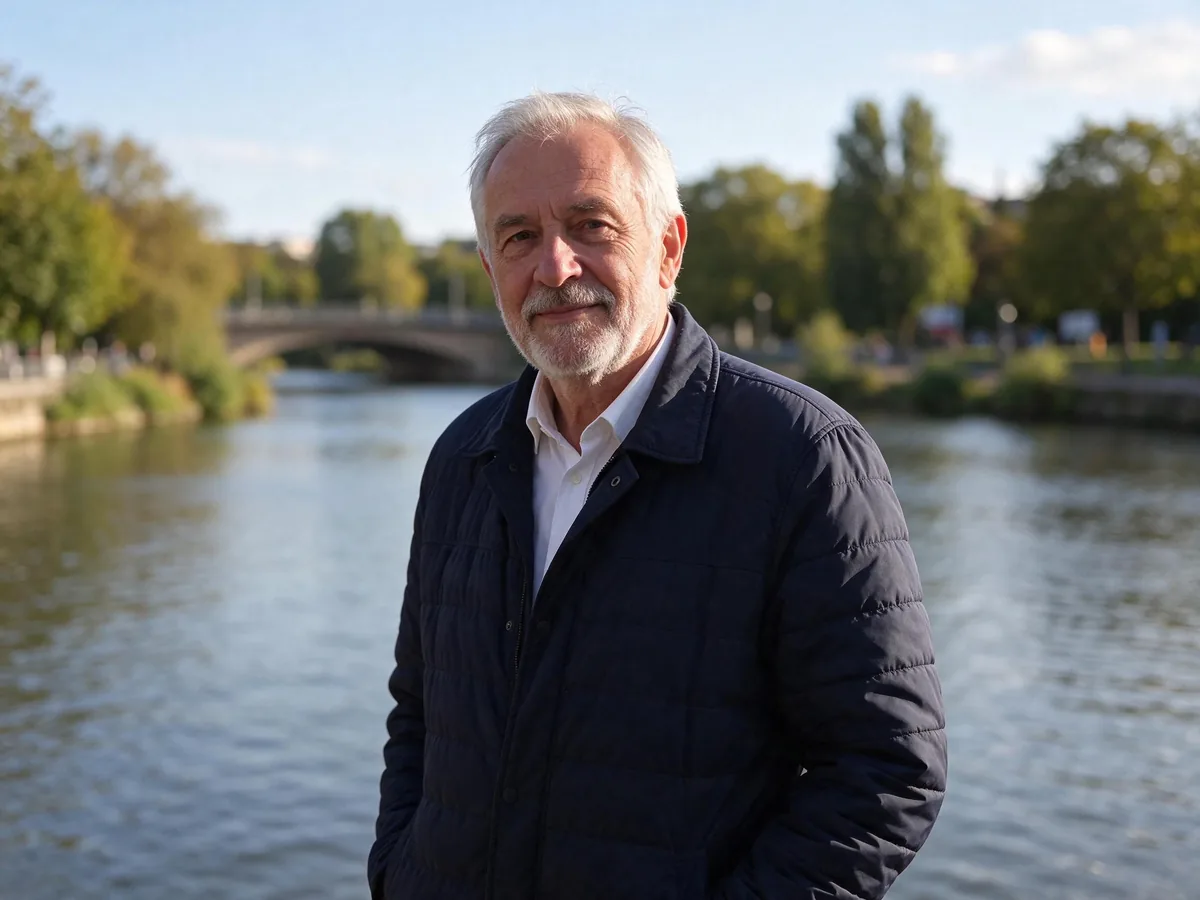
Strong consistency across edits
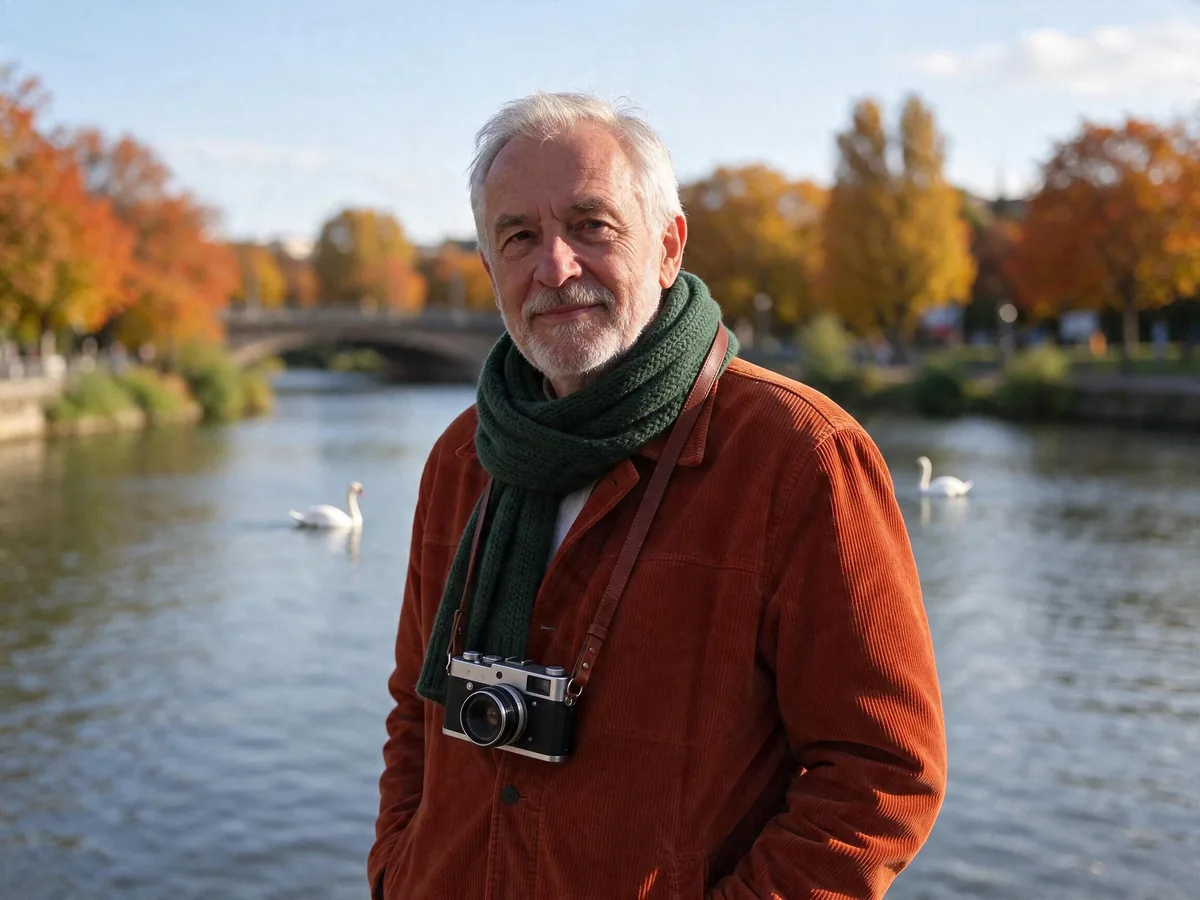
Change one thing per round and keep going from the result. This photo of a man by a river went through five rounds on 5.5: the navy jacket became rust-orange corduroy, a green wool scarf went round his neck, the trees behind him turned to autumn colors, a film camera appeared on a strap at his chest, and two swans joined the river. His face, beard, smile and pose stayed where they were, and so did the bridge, the water and the sky. For other kinds of photo fixes, see the AI Photo Editor.
Strong multilingual text
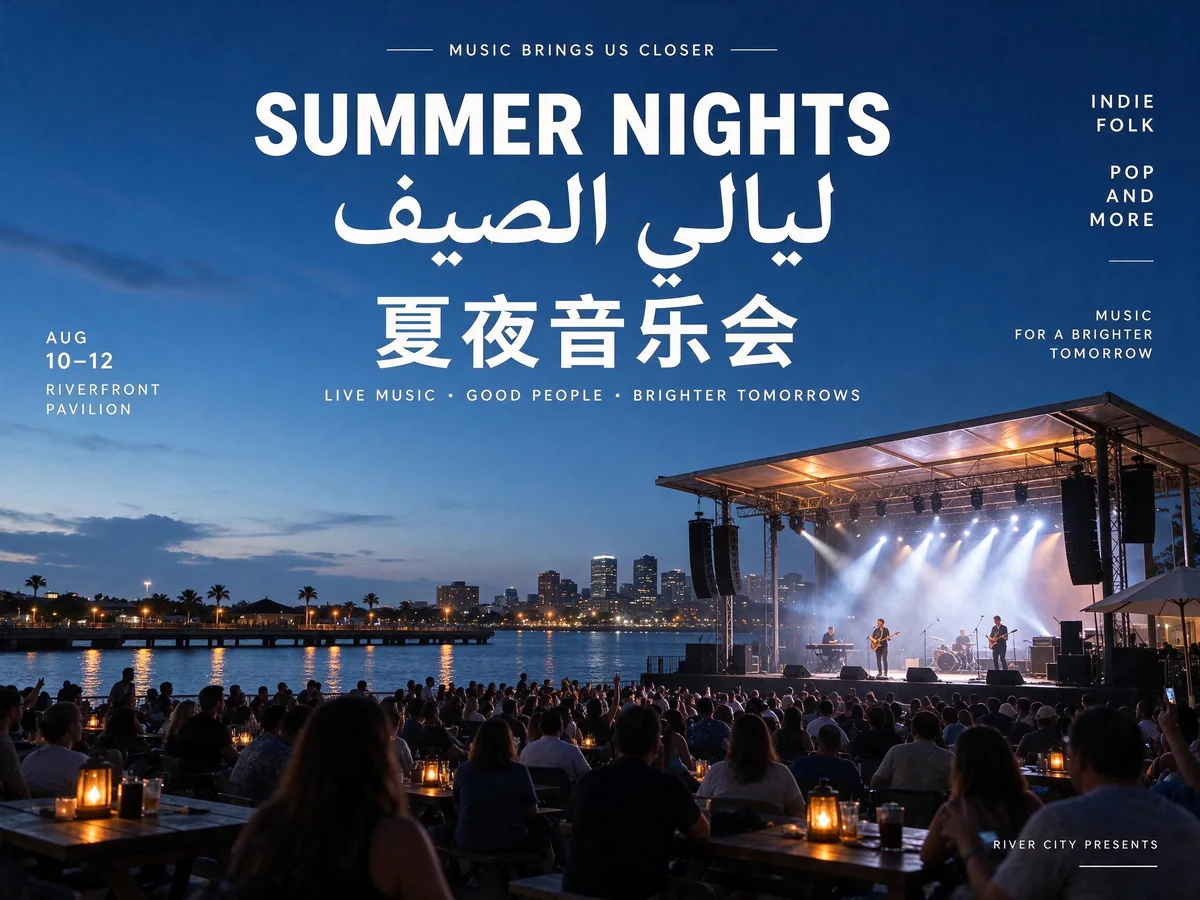
Put each line in quotes and say which language it is. This concert poster came from text alone on Seedream 5.5: the title runs in three scripts, “SUMMER NIGHTS” in English, “ليالي الصيف” in Arabic and “夏夜音乐会” in Chinese, each spelled as in the prompt, with the Arabic joined up and running right to left. The smaller English lines around it, like the dates and the venue, were the model's own additions.
Character consistency
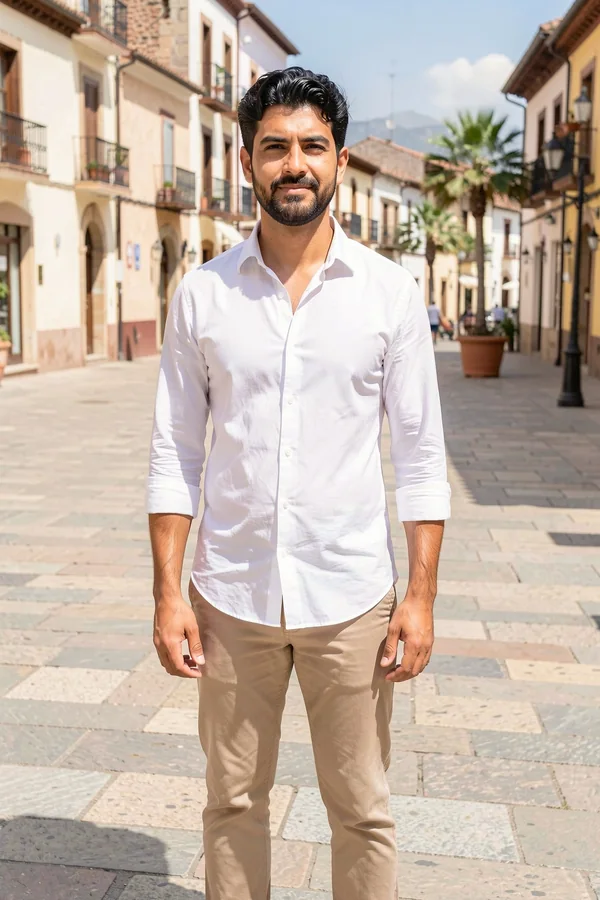
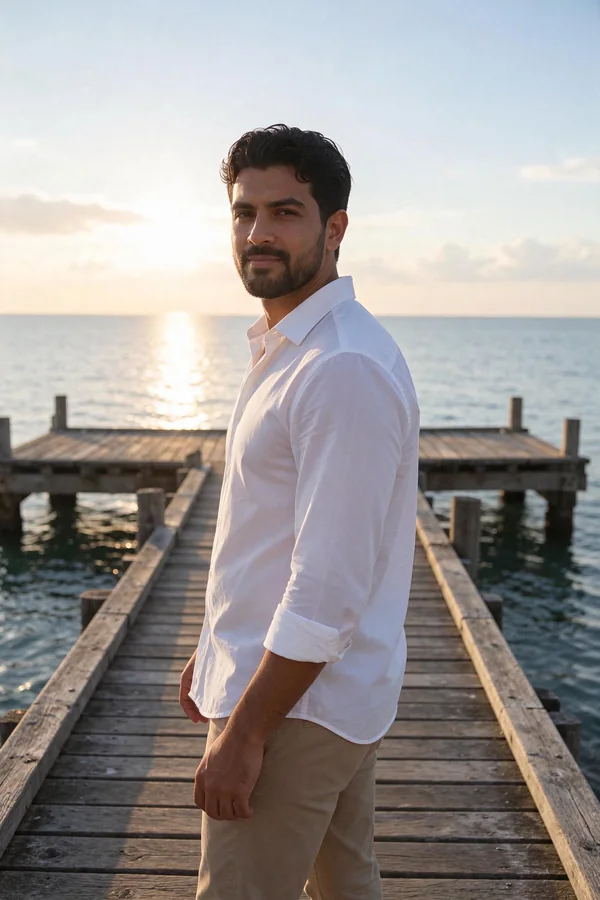
One photo of a person is enough to put them somewhere else. Here a photo of a man in a white shirt and beige trousers on a sunny town square went to 5.5 with a request to stand him on a wooden pier at sunset, turned side-on and looking back over his shoulder. The face, the black wavy hair, the beard, the rolled sleeves and the trousers all carried over to the new scene.
Multi-image reference
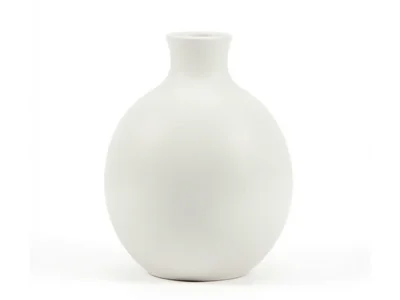
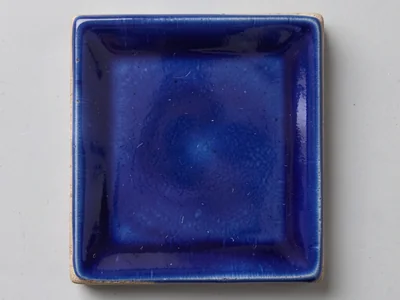
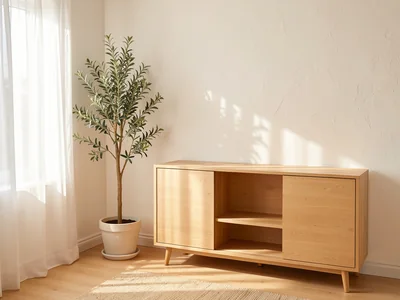
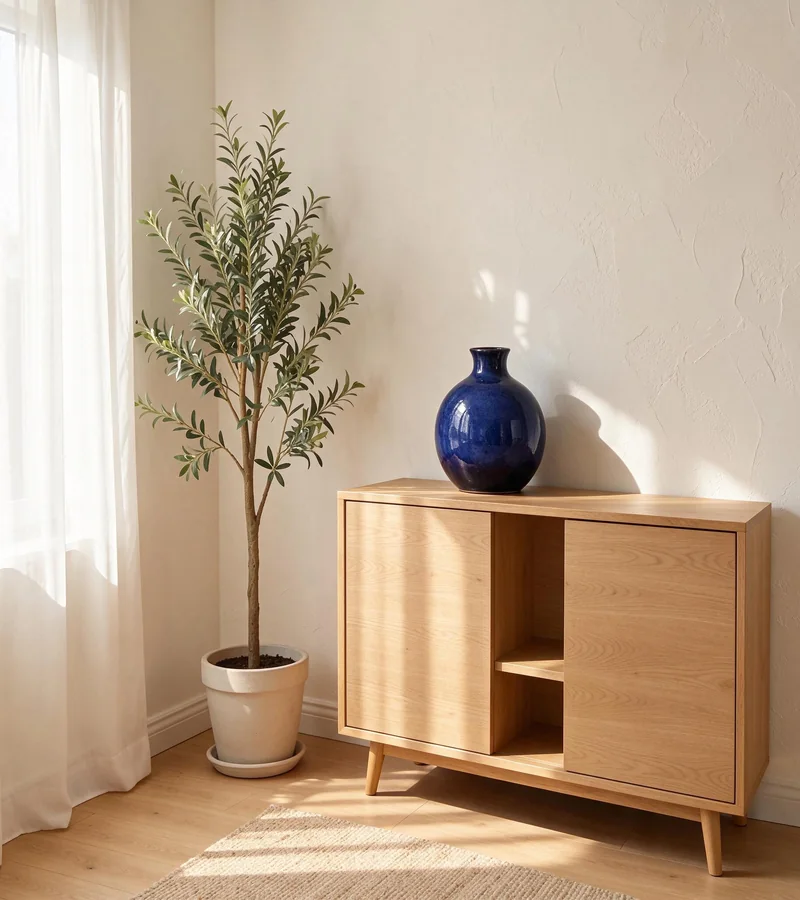
Give each photo one job and say which is which. Here the first picture is a plain white ceramic vase, the second a tile with a deep cobalt blue glaze, and the third an empty corner of a living room with an oak sideboard. 5.5 glazed the vase in that blue and set it on the sideboard, keeping the vase's round body and narrow neck, the olive tree, the curtains and the afternoon light from the photos.
Have a picture you want to change round by round? Upload it or write a prompt and try 5.5.
How to use Seedream on Plimo
Write a prompt
Write it in reading order. For a poster or a chart, start with the headline in quotes, then say what sits under it and which colors to use. For a scene, say who is where and what the light is like.
Upload reference photos
A color swatch, a product photo or a napkin sketch says more than a paragraph. Add a few and say what each one is for, like “use the bag from photo 1 in the green from photo 2”.
Pick a version
Flash for trying several directions fast. 5.5 for finished pictures, lettering and keeping a character the same. Lite for large prints and complex prompts that need reasoning.
Generate and compare
Run the idea a few times on Flash until you settle on a composition and style, then give the same prompt to 5.5 or Lite for the final version.
Download or keep editing
Download the picture for print or social media. If you'd like it moving, hand it to image to video as the starting frame of a clip.
Why use Seedream on Plimo
Free to start
The 100 credits new accounts get cover 5.5 at every size.No visible watermark
Plimo adds no visible watermark to the pictures you make with or without a membership.One account for every model
The same prompt also runs on Nano Banana 2.1, GPT Image 2.5, Qwen Image 3.0 or FLUX 3 Image without a new account.
How it compares with other image models
Nano Banana
For 4K output pick Google's Nano Banana and for editing one picture over many rounds stay on 5.5.
GPT Image
For up to 16 reference images or 4K output pick GPT Image 2.5 from OpenAI, and for a picture you'll refine over many rounds use 5.5.
Qwen Image
Qwen Image 3.0 from Alibaba is priced the same at 1K and 2K.
How the family got to 5.5
April 2025
Version 3.0
ByteDance Seed's bilingual Chinese and English model. It raised the native resolution and made text rendering far more reliable in both languages, small Chinese characters included.
September 2025
4.0
Making and editing pictures moved into one model that could read several reference images at once. ByteDance reported inference more than ten times faster than 3.0, and a higher top resolution.
December 2025
4.5
A larger refresh. It picked out the main subject more accurately in multi-image edits, stayed closer to reference details, and handled typography and dense text better than 4.0.
February 2026
Seedream 5.0 Lite
A smaller model built around reasoning. It reasons through the prompt before generating, from physical logic to the order of steps. ByteDance says it scores above 4.5.
July 2026
Seedream 5.0 Pro
Aimed at design work: dense infographics, text in more than ten languages including right-to-left Arabic, and faces from separate photos merged into one group picture.
September 2026
5.0 Flash
Much of what 5.0 Pro can do, in a faster, lower-cost model for work where speed and price matter most.
November 2026
5.5
Focused on multi-turn editing consistency: untouched areas stay unchanged for up to 100 rounds. Text rendering got cleaner, dense small text included, light, materials and skin look more natural, and it works from up to ten reference photos at once.