Nano Banana 2: Make New Images and Edit Your Photos by Describing the Change
What is Nano Banana AI?
Google's image model for photo editing in plain words, multi-image fusion and old photo restoration.
It is the nickname Google uses for its Gemini image models. They are known for editing in plain words: you say what to change in a photo, and the rest of it stays as it was.

Nano Banana 2
The previous version, released in February 2026.
- 1K / 2K / 4K
- Up to 6 reference photos

Nano Banana 2.1
The newest version, released in October 2026.
- 1K / 2K / 4K
- Up to 6 reference photos
What it's known for
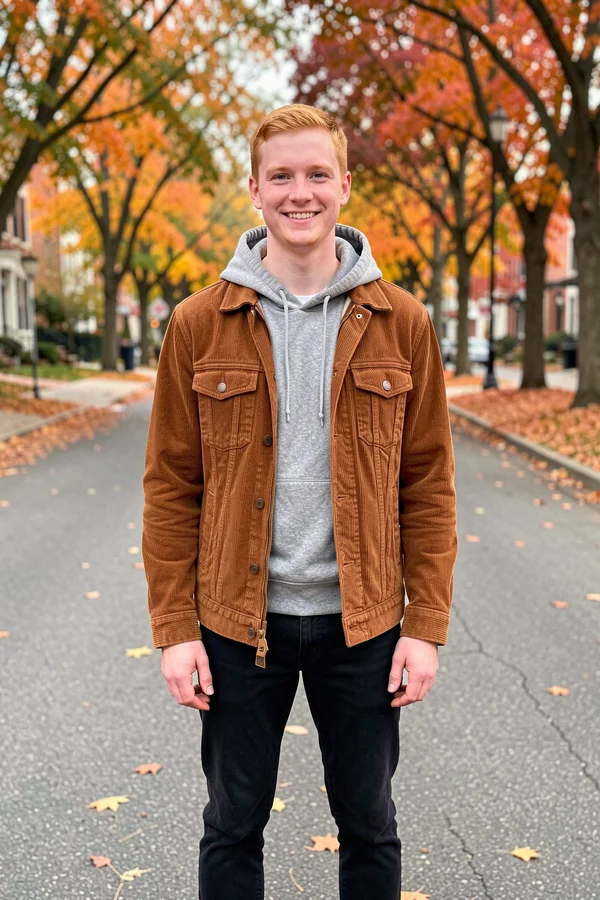
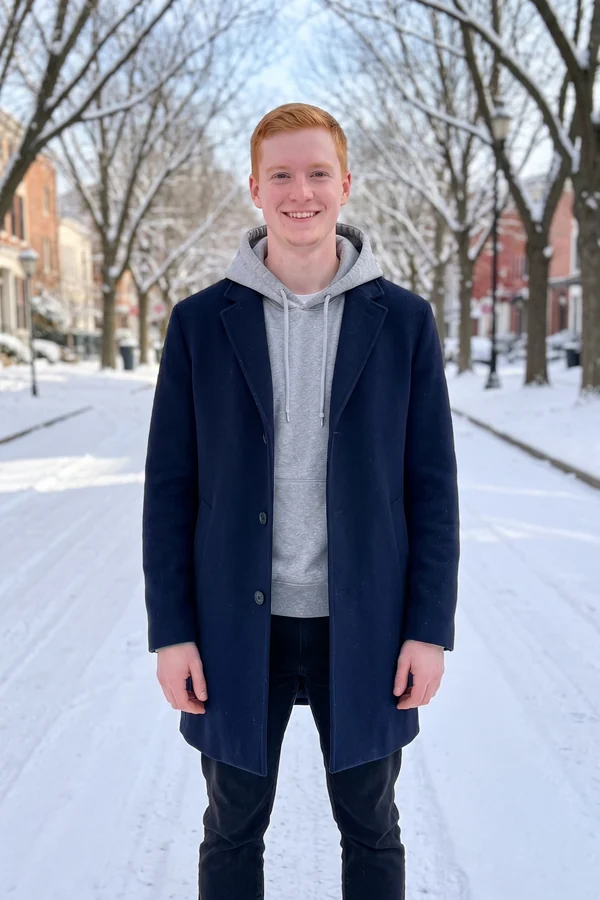
Photo editing in plain words
One sentence asked for a navy wool coat instead of the brown corduroy jacket, and for the same street after fresh snow instead of autumn leaves. His face, red hair, smile, grey hoodie and pose stayed the same. Made with version 2.
For other kinds of edits, such as removing people or changing a background, see the AI photo editor.


Multi-image fusion
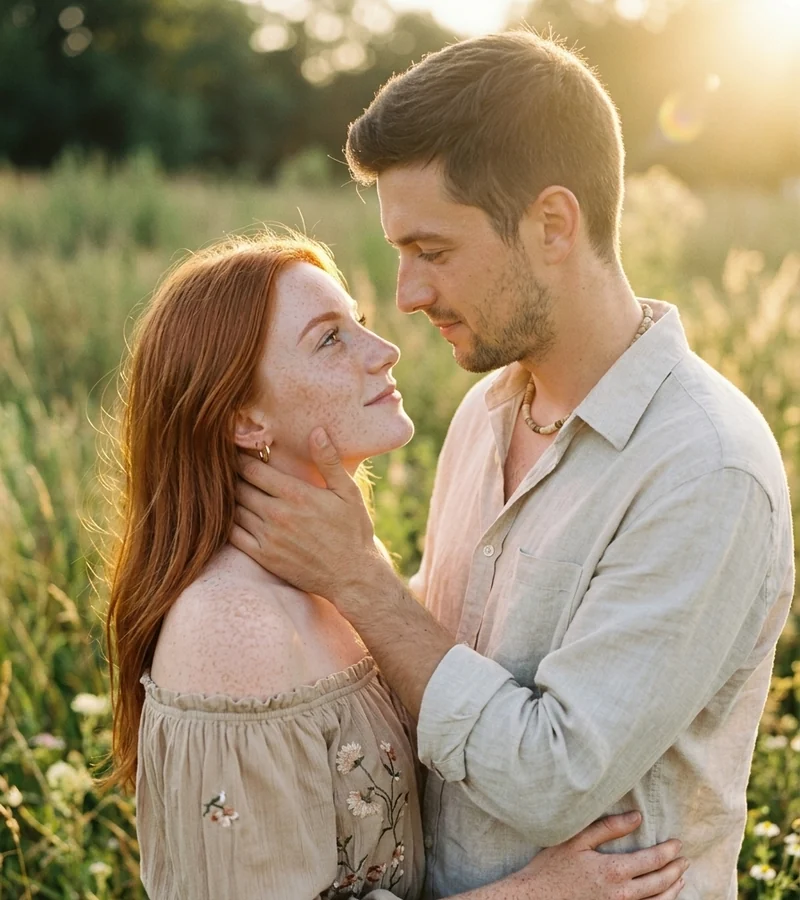
Two portraits taken separately, a red-haired woman in a park and a dark-haired man in a café, went in with one sentence asking for a couple in a meadow at sunset. Both people came through in the new picture: her red hair and freckles, his short dark hair and stubble. The clothes and the setting came from the sentence.
Version 2.1 made this one, and up to six photos can go into a single picture.

Old photo restoration and colorization
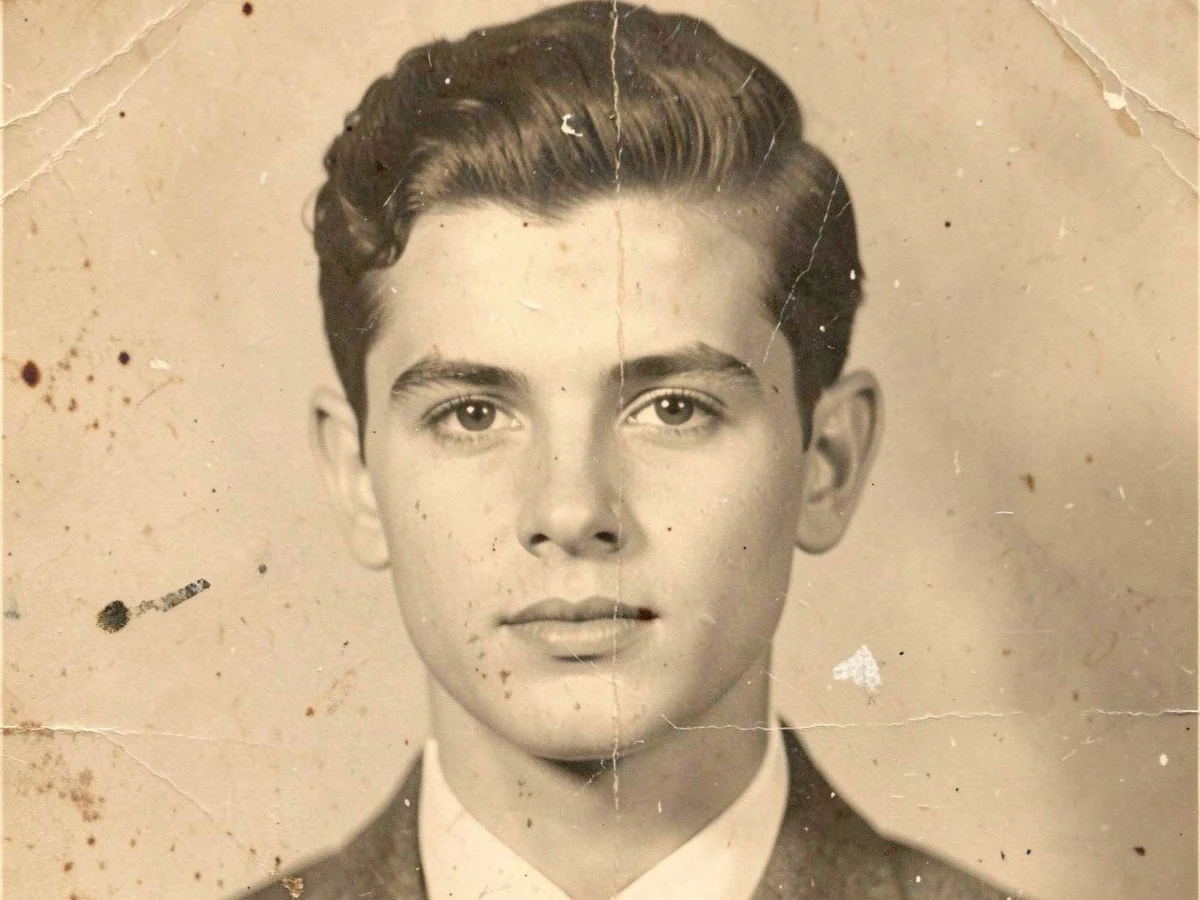
A creased, spotted black-and-white portrait from the 1950s came back in natural color, with the scratches, cracks and stains gone. His face, hair, suit and the framing stayed where they were. Made with version 2.1.
Have a photo you want to change? Describe it in one sentence.
How the model has changed
August 2025
The original
Google released it as Gemini 2.5 Flash Image after testing it anonymously on LMArena under a codename. It reached most people as Nano Banana in the Gemini app, built for one-sentence edits such as blurring a background, removing a person, changing a pose or coloring a black-and-white photo.
November 2025
The Pro version
Google Nano Banana Pro is built on Gemini 3 Pro. It writes legible text in several languages, draws infographics and diagrams, and blends up to 14 images while keeping up to five people recognizable.
February 2026
Version 2
Also called Gemini 3.1 Flash Image, it brought the world knowledge and quality of Pro to Flash speed. It writes accurate, legible text and can translate the words inside a picture.
October 2026
Version 2.1
The latest update, built on Gemini 3.6 Flash. It improves visual quality, prompt adherence, character consistency over multi-turn edits and text rendering.
How to use Nano Banana on Plimo
Upload photos
For an edit, upload the photo you want to change, plus any photo you want to borrow from, up to six in all. For a brand-new picture, start from words alone.
Describe the change
Write your Nano Banana prompt the way you'd say it: name what changes and what has to stay, like “swap the jacket for a navy coat, keep his face and pose.”
Pick a version and size
Choose version 2 or 2.1, then a size from 1K up to 4K.
Generate
Download the picture, or change one more thing and generate again. To make it move, take it to image to video and use it as the first frame.
Why use it on Plimo
Compare versions side by side
Run the same prompt on version 2 and 2.1 and keep the result you like.Other image models on one account
When a picture misses, send the same prompt to GPT Image 2.5, Seedream 5.5 or FLUX 3 Image without opening a new account.No editing software to learn
No masks, layers or selection tools: the change is written as a sentence.
How it compares with other image models
GPT Image
GPT Image 2.5 from OpenAI can output a transparent background and takes up to 16 reference images.
MiniMax Image
Makes pictures at 2K or 4K only, and the free credits new accounts get work at both sizes.
Grok Imagine
Grok Imagine from xAI also makes videos, so a picture can carry on into a clip with sound in the same series.
Wan
Wan from Alibaba reaches 4K from text alone on Wan 2.7 Image Pro, and the Wan 3.0 video model carries a picture on into video.
FLUX
FLUX 3 Image from Black Forest Labs takes up to 10 reference images, with FLUX 3 Video in the same series.
Seedream
Seedream 5.5 from ByteDance keeps the person and the scene steady when you edit one picture over several rounds.
Qwen Image
Qwen Image 3.0 from Alibaba costs the same at 1K and 2K.