Grok Imagine: Make Grok AI Videos with Sound on Grok Imagine 1.5
What is Grok Imagine?
xAI's video and image models: clips that always come with sound, and pictures made from a sentence or from your own photos.
Grok Imagine is xAI's family of video and image models, and the Imagine feature in the Grok app runs on it. Every clip it makes comes with sound: a voice, footsteps, rain, a bit of music. Upload a photo and use Grok image to video to put that person or pet into a new scene, or make the picture first and turn it into a clip.
Grok Imagine 1.5 is the Grok video generator, for clips with sound from a sentence or from your photos. Grok Imagine Image 2.0 is the Grok AI image generator: it makes new pictures and reworks your own photos from a sentence. The basic Grok Imagine Image costs fewer credits per picture, for rough ideas.
Grok Imagine 1.5
Video with native audio, using your photos as references.
- 6–15 s
- 480P / 720P
- Always with sound
- Up to 7 reference photos

Grok Imagine Image 2.0
Newest image model, for text-to-image and image-to-image.
- 1K / 2K
- Up to 3 reference photos

Grok Imagine Image
Lower-cost version, for quick drafts.
- 1K
- Up to 5 reference photos
What you can make with Grok
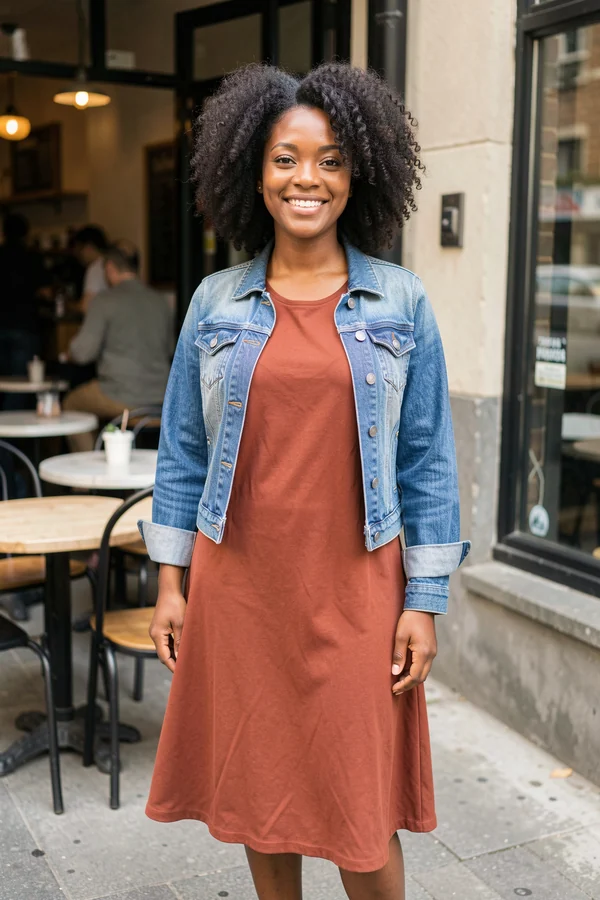

Reference-to-video with version 1.5
Your photos work as references. This woman's photo went in, and her face, curly hair, denim jacket and rust dress carried over, while the seaside promenade at sunset and the bike ride came from one line of prompt. Add up to seven photos to bring several people or pets into one scene; the clip keeps the shape of your photo.
To keep the photo's own background and set that exact picture in motion, use image to video, where your photo becomes the first frame.
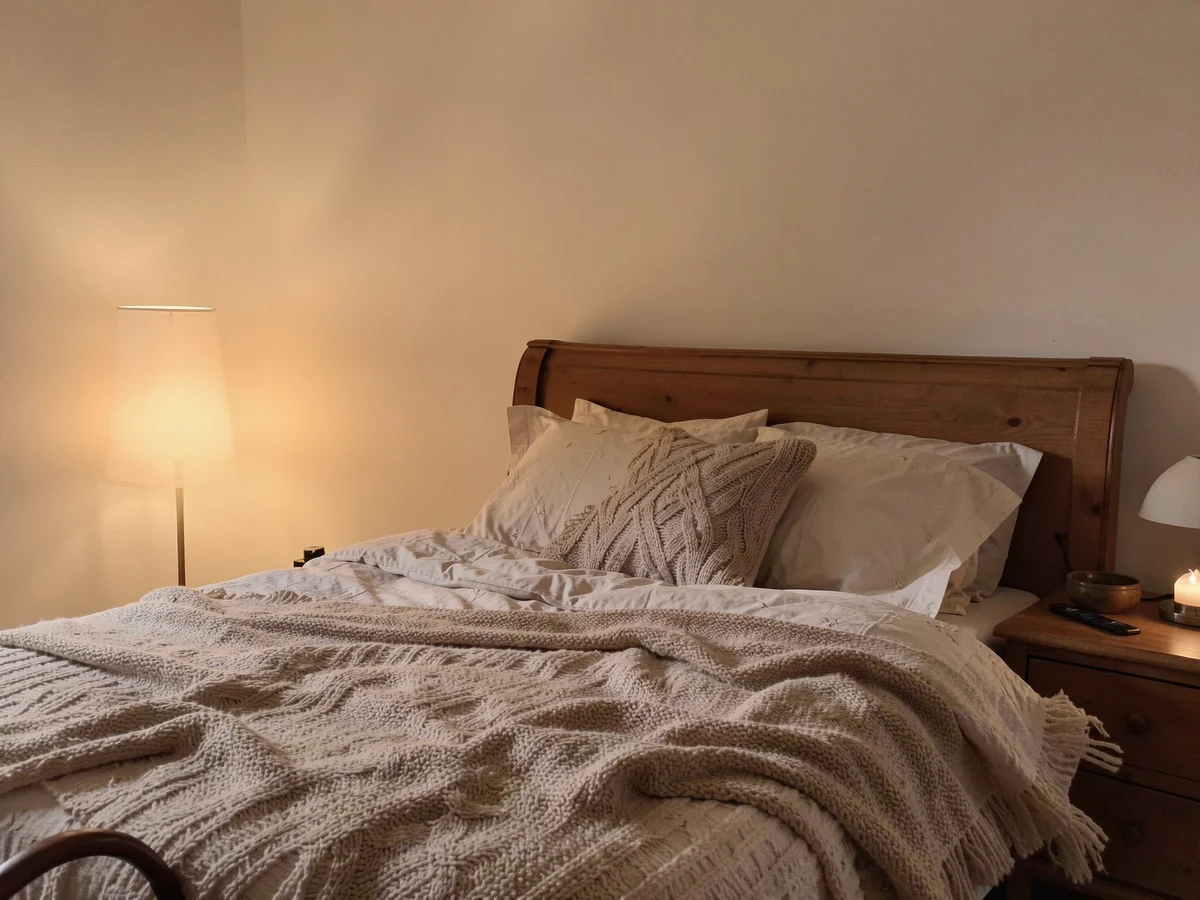
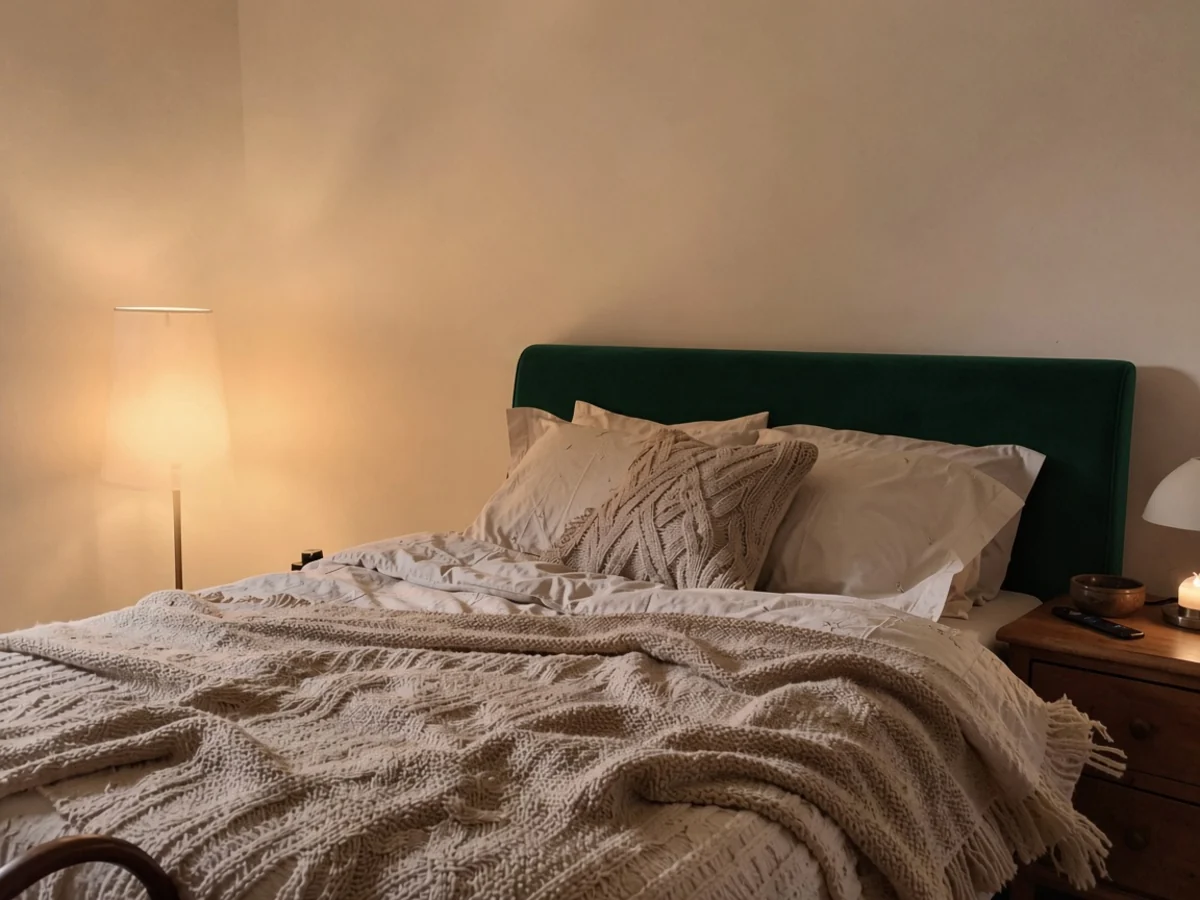
Image-to-image with Image 2.0
Upload a photo and describe the one change. Here the wooden headboard became dark green velvet, while the pillows, the knit blanket, both lamps, the candle on the bedside table and the framing stayed as they were. Naming what should stay the same, as well as what should change, helps keep the rest of the photo untouched.
For more models that rework a photo, open Image to Image.


From a still to a clip in one family
Image 2.0 painted this stormy lighthouse from a sentence. Version 1.5 then took the picture as its reference and set the sea moving: waves break over the rocks, the beam sweeps across the water and lightning flashes, in the same painterly style.
Have a photo or a scene in mind?
How to use Grok on Plimo
Choose video or picture
Go with video for a clip with sound, or switch to a picture model for a still.
Describe the scene and its sound
Say what happens and what we should hear: rain on a tin roof, a crowd counting down. To bring in a particular person, pet or product, add their photos as references.
Pick a length and resolution
A few seconds is enough for a reaction; go longer when several things need to happen in order. Try an idea at 480p, then generate the one you like again at 720p.
Generate and download
Download the clip with its sound and post it. Not quite right? Change a line and run it again.
Why use Grok Imagine on Plimo
Free to start
New accounts get free credits, enough for a first Grok clip, and no card is needed.Native audio
Voices, music and background noise come out with the picture, so there's nothing to add afterwards.No xAI account or app
Everything runs in your browser on your Plimo account, with no separate xAI sign-up.Image and video in one account
Make a still with Image 2.0 and use it as a reference for your next clip, on the same credits.
How xAI's Imagine models grew
December 2024
Aurora
xAI's first in-house image model, built into Grok. It was made for photorealistic pictures that follow the prompt closely, and to edit pictures people upload.
August 2025
Imagine in the Grok app
Image and video generation arrived in the Grok app under the Imagine name, turning pictures into short clips.
October 2025
Version 0.9
Better picture quality and motion, and video with synced audio that could include speech and singing.
February 2026
Version 1.0
Clips grew to 10 seconds at 720p, with much better audio.
June 2026
Version 1.5
Steadier motion and physics, and clearer speech that stays in sync with the picture. This is the video model you use on Plimo, with sound in every clip.
August 2026
Image 2.0
The second-generation picture model, focused on reworking your own photos and on combining several photos into one picture.
Grok and other video models
Kling
Kling 4.0 makes a single clip of up to 30 seconds and can rework a video you filmed, changing its scene, weather or style.
Veo
Veo 3.1 Fast makes 8-second clips at up to 4K and can take both an opening and a closing frame.
Seedance
Seedance 2.0 Mini and Seedance 2.5 can follow the moves and camera work of up to three reference videos, and Mini also runs on a new account's free credits.
Hailuo AI
Hailuo AI's MiniMax H3 Max and MiniMax H3 can use photos and reference videos together, and MiniMax H3 goes up to 2K.
Wan
Wan 3.0 covers 2- to 30-second clips with up to five reference videos, and the Wan family makes pictures too.
Vidu
Vidu Q4 Preview reaches 4K and lets you pass in 15 reference photos for a single clip.
FLUX
FLUX 3 Video starts with a draft that needs fewer credits, so an idea can be checked before the final render.
SkyReels
SkyReels comes in Std and Fast versions with sound in every clip, and Fast costs fewer credits.
HappyHorse
HappyHorse 1.1 takes up to nine reference photos, and the photos cost no extra credits.